




The proffer package profiles R code to find bottlenecks. Visit https://r-prof.github.io/proffer/ for documentation. https://r-prof.github.io/proffer/reference/index.html has a complete list of available functions in the package.
Why use a profiler?
This data processing code is slow.
system.time({
  n <- 1e5
  x <- data.frame(x = rnorm(n), y = rnorm(n))
  for (i in seq_len(n)) {
    x[i, ] <- x[i, ] + 1
  }
  x
})
#>   user  system elapsed
#> 82.060  28.440 110.582
Why exactly does it take so long? Is it because for loops are slow as a general rule? Let us find out empirically.
library(proffer)
px <- pprof({
  n <- 1e5
  x <- data.frame(x = rnorm(n), y = rnorm(n))
  for (i in seq_len(n)) {
    x[i, ] <- x[i, ] + 1
  }
  x
})
#> ● url: http://localhost:57517
#> ● host: localhost
#> ● port: 57517
When we navigate to http://localhost:64610 and look at the flame graph, we see [<-.data.frame() (i.e. x[i, ] <- x[i, ] + 1) is taking most of the runtime.
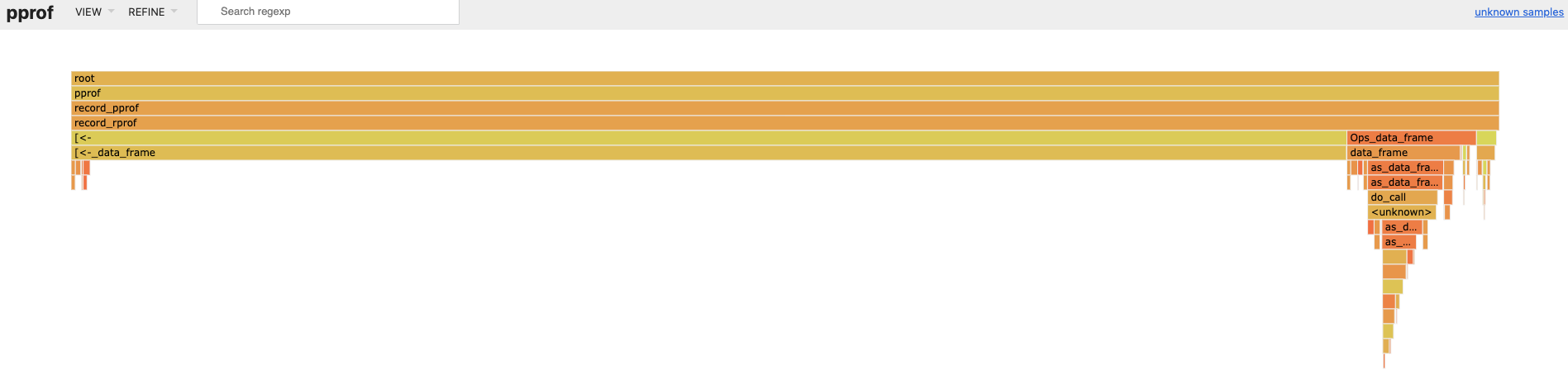
So we refactor the code to avoid data frame row assignment. Much faster, even with a for loop!
system.time({
  n <- 1e5
  x <- rnorm(n)
  y <- rnorm(n)
  for (i in seq_len(n)) {
    x[i] <- x[i] + 1
    y[i] <- y[i] + 1
  }
  x <- data.frame(x = x, y = y)
})
#>    user  system elapsed
#>   0.012   0.000   0.013
Moral of the story: before you optimize, throw away your assumptions and run your code through a profiler. That way, you can spend your time optimizing where it counts!
Managing the pprof server
The pprof server is a background processx process, and you can manage it with the processx methods described here. Remember to terminate the process with $kill() when you are done with it.
# px is a process handler.
px <- pprof({
  n <- 1e4
  x <- data.frame(x = rnorm(n), y = rnorm(n))
  for (i in seq_len(n)) {
    x[i, ] <- x[i, ] + 1
  }
  x
})
#> ● url: http://localhost:50195
#> ● host: localhost
#> ● port: 50195

# Summary of the background process.
px
#> PROCESS 'pprof', running, pid 10451.

px$is_alive()
# [1] TRUE

# Error messages, some of which do not matter.
px$read_error()
#> [1] "Main binary filename not available.\n"

# Terminate the process when you are done.
px$kill()
Serving pprof remotely
As with Jupyter notebooks, you can serve pprof from one computer and use it from another computer on the same network. On the server, you must
- Find the server’s host name or IP address in advance.
- Supply
"0.0.0.0"as thehostargument.
system2("hostname")
#> mycomputer

px <- pprof({
  n <- 1e4
  x <- data.frame(x = rnorm(n), y = rnorm(n))
  for (i in seq_len(n)) {
    x[i, ] <- x[i, ] + 1
  }
  x
}, host = "0.0.0.0")
#> ● url: http://localhost:610712
#> ● host: localhost
#> ● port: 610712
Then, in the client machine navigate a web browser to the server’s host name or IP address and use the port number printed above, e.g. https://mycomputer:61072.
Installation
For old versions of proffer (0.0.2 and below) refer to these older installation instructions instead of the ones below.
The R package
The latest release of proffer is available on CRAN.
install.packages("proffer")Alternatively, you can install the development version from GitHub.
# install.packages("remotes")
remotes::install_github("r-prof/proffer")
The proffer package requires the RProtoBuf package, which may require installation of additional system dependencies on Linux. See its installation instructions.
Non-R dependencies
proffer requires the copy of pprof that comes pre-packaged with the Go language. You can install Go at https://go.dev/doc/install.1
Configuration
You can set the PROFFER_GO_BIN environment variable to a custom location for the Go binary. See usethis::edit_r_environ() for directions on how to make this configuration permanent.
Local testing
Run pprof_sitrep() again to verify that everything is installed and configured correctly.
library(proffer)
pprof_sitrep()
#> • Call test_pprof() to test installation.
#>
#> ── Requirements ────────────────────────────────────────────────────────────────
#> ✔ Go binary '/usr/local/go/bin/go'
#>
#> ── Custom ──────────────────────────────────────────────────────────────────────
#> ✔ `PROFFER_GO_BIN` '/usr/local/go/bin/go'
If all dependencies are accounted for, proffer should work. Test it out with test_pprof(). On a local machine, it should launch a browser window showing an instance of pprof.
library(proffer)
process <- test_pprof()
When you are done testing, you can clean up the process to conserve resources.
process$kill()Telemetry
Recent versions of Go implement telemetry by default. Functions in proffer such as pprof() turn off telemetry in order to comply with CRAN policies. Read https://go.dev/doc/telemetry to learn how to restore telemetry settings after using proffer.
Contributing
We encourage participation through issues and pull requests. proffer has a Contributor Code of Conduct. By contributing to this project, you agree to abide by its terms.
Resources
Profilers identify bottlenecks, but the do not offer solutions. It helps to learn about fast code in general so you can think of efficient alternatives to try.
What about profvis
profvis is a more widely used and established profiling package, and it existed before proffer. proffer was originally developed because:
-
profvisflame graphs did not originally support aggregation. -
profvisvisualizations performed slowly on large profiling datasets.
Since then, (1) has been fixed, and it is possible to produce aggregated flame graphs with print(profvis::provis(...), aggregate = TRUE). When (2) is also addressed, proffer may be superseded.
One of the graph visualizations requires Graphviz, which you https://www.graphviz.org/download, but this visualization is arguably not as useful as the flame graph.↩︎